---
title: WindTunnel Tangle Guard All-terrain - Low/ No Suction
description: This article contains all the steps necessary to fix suction issues with your Vacuum.
---
[Skip to content](https://knowledgelibrary.ttifloorcare.com/hoover-canada-library/windtunnel-tangle-guard-all-terrain-low/-no-suction#main-content)
- [English](https://knowledgelibrary.ttifloorcare.com/hoover-canada-library/windtunnel-tangle-guard-all-terrain-low/-no-suction)
- [Français - Canada](https://knowledgelibrary.ttifloorcare.com/fr-ca/hoover-canada-library/windtunnel-tangle-guard-all-terrain-low/-no-suction)
English
Show submenu for translations
![Hoover-Logo\_2021\_Brushed\_RGB\_Med-1.png\]](https://knowledgelibrary.ttifloorcare.com/hs-fs/hubfs/Hoover-Logo_2021_Brushed_RGB_Med-1.png?height=47&name=Hoover-Logo_2021_Brushed_RGB_Med-1.png)
Open main navigation
Close main navigation
- - [English](https://knowledgelibrary.ttifloorcare.com/hoover-canada-library/windtunnel-tangle-guard-all-terrain-low/-no-suction)
- [Français - Canada](https://knowledgelibrary.ttifloorcare.com/fr-ca/hoover-canada-library/windtunnel-tangle-guard-all-terrain-low/-no-suction)
English
Show submenu for translations
- [Go to Hoover.ca](https://hoover.ca/)
[Go to Hoover.ca](https://hoover.ca/)
Welcome. How can we help you?
- There are no suggestions because the search field is empty.
1. [Hoover Canada Support Library](https://knowledgelibrary.ttifloorcare.com/hoover-canada-library?hsLang=en)
2. [Troubleshooting](https://knowledgelibrary.ttifloorcare.com/hoover-canada-library/troubleshooting?hsLang=en)
3. [WindTunnel Tangle Guard All-Terrain](https://knowledgelibrary.ttifloorcare.com/hoover-canada-library/troubleshooting?hsLang=en#windtunnel-tangle-guard-all-terrain)
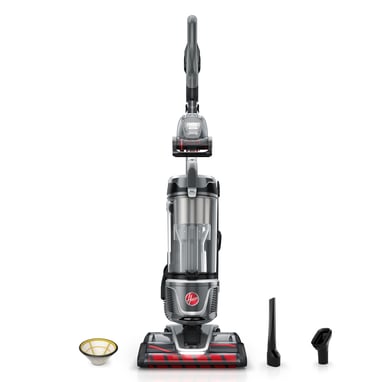
# WindTunnel Tangle Guard All-terrain - Low/ No Suction
## This article contains all the steps necessary to fix suction issues with your Vacuum.
### 
**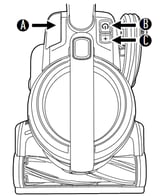**
**TIP:** Toggle your vacuum MODE **(C)** so that it's appropriate to the type of floor you're cleaning
### 
### Follow these steps if you're experiencing low/ no suction:
1. Let's start by making sure your dirt cup is properly seated in the unit and there are no gaps.
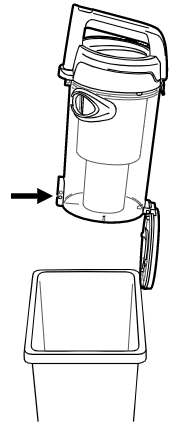
2. Empty your **dirt cup** if needed by pressing the release buttonon the lid and rocking the cup out, once removed open the trap door by pressing the release mechanism.
3. After emptying the dirt cup, pull the filter assembly remove it, and clean the separator with a cloth or accessory. Once the separator is completely clean reassemble it properly and make sure it locks firmly.
4. Once you have removed and emptied the dirt cup and separator filter, you should remove the **rinseable filter** located underneath the tank's lid. You can remove the filter by pressing the open button on the lid and pulling on the filter. While you are in this step, make sure to check and clean your *cyclone tubes* for any possible clogs.
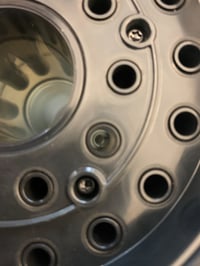
5. If you are currently cleaning, tap your filter until clean then replace it in the unit, otherwise rinse the filter under water until it's clear and squeeze it to remove excess water. Allow 24 hours to dry then replace it in the unit.
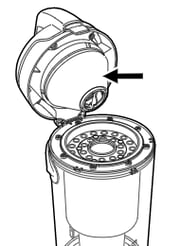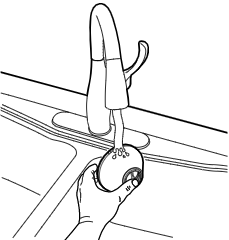
6. After cleaning the rinseable filter, pull the latch to remove the **exhaust filter** located between the nozzle and the dirt cup.
7. Tap the filter until clean or wipe down any remaining dust with a dry cloth. **Do not rinse!!
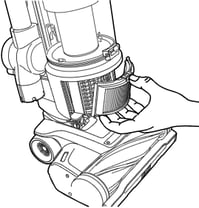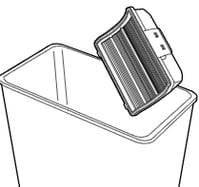
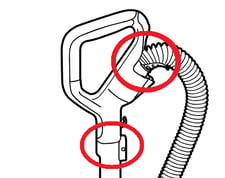**
8. Now check your hose airpath and extension tools at the different connection points for any clogs. Make sure your vacuum is upright and press the hose release button, inspect your hose and clear out any clogs, then replace it back in the unit.
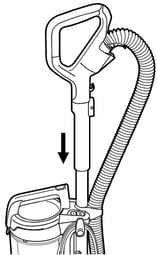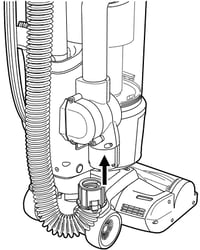
9. Lastly, you should disconnect the nozzle from the unit and check the airpath there. Remove any clog and debris if any. **You can see the video below for assistance on how to do this.**
**NOTE:** Make sure your air valve dial is set up to the desired cleaning position.
-2.jpg?width=688&height=250&name=rtaImage%20(1)-2.jpg)
**CAUTION:** Do not replace any of the filters if they are damp.
**NOTE:** If you have tried to troubleshoot and need to fill a warranty claim, please visit our **[Warranty Information](https://hoover.com/pages/warranty-information)** page for more information on how to do so.
---
- [Troubleshooting](https://knowledgelibrary.ttifloorcare.com/hoover-canada-library/troubleshooting?hsLang=en#main-content)
- [Batteries & Chargers](https://knowledgelibrary.ttifloorcare.com/hoover-canada-library/troubleshooting?hsLang=en#batteries-chargers)
- [CleanSlate](https://knowledgelibrary.ttifloorcare.com/hoover-canada-library/troubleshooting?hsLang=en#cleanslate)
- [CleanSlate XL](https://knowledgelibrary.ttifloorcare.com/hoover-canada-library/troubleshooting?hsLang=en#cleanslate-xl)
- [ONEPWR CleanSlate](https://knowledgelibrary.ttifloorcare.com/hoover-canada-library/troubleshooting?hsLang=en#onepwr-cleanslate)
- [WindTunnel Tangle Guard](https://knowledgelibrary.ttifloorcare.com/hoover-canada-library/troubleshooting?hsLang=en#windtunnel-tangle-guard)
- [WindTunnel Tangle Guard All-Terrain](https://knowledgelibrary.ttifloorcare.com/hoover-canada-library/troubleshooting?hsLang=en#windtunnel-tangle-guard-all-terrain)
- [ONEPWR Evolve Pet](https://knowledgelibrary.ttifloorcare.com/hoover-canada-library/troubleshooting?hsLang=en#onepwr-evolve-pet)
- [ONEPWR Evolve Pet Elite](https://knowledgelibrary.ttifloorcare.com/hoover-canada-library/troubleshooting?hsLang=en#onepwr-evolve-pet-elite)
[](https://hoover.ca/pages/contact-us)
Hoover Support Center
Copyright © 2026, TTI Floor Care North America